AI comes up a lot right now, especially in design. Some people are excited about it; some are overwhelmed by it. What I find most often is that people are simply not sure where it fits in the design process or how to get started.
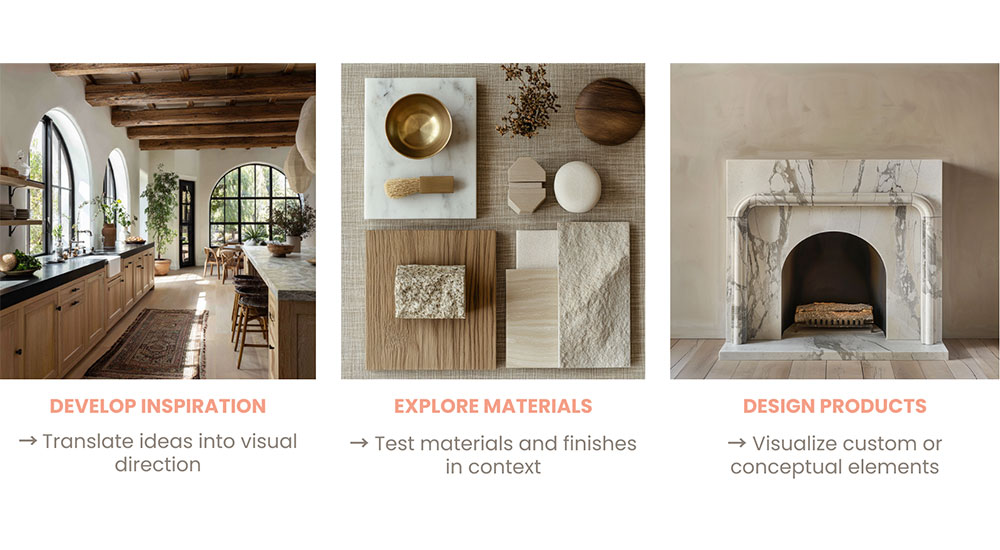
Above rendering: AI can support multiple stages of the design process – from developing early inspiration and testing materials in context to visualizing custom or conceptual elements before they’re built. AI-generated imagery by Jessica Nelson/AI for Interiors
Here’s how I think about it. AI does not design for you. It does not make decisions for you. It is simply a tool that can take some of the heavier, more repetitive work off your plate so you can spend more time doing the parts of your job that you love or that truly require you. When it works well, it shows up in three main areas.
- Early Creative Work. AI can be helpful at the beginning of a project, when ideas are still loose and nothing is finalized. Instead of trying to find the exact reference image or struggling to describe a direction in words, you can explore a few options quickly. You can test different moods, materials or color directions before you commit to anything. This is not about creating finished designs. It is about helping you clarify what you are trying to say earlier in the process. Text-based tools like ChatGPT, Google Gemini or Claude can help you organize your thoughts or put language to a concept. Visual AI tools like Nano Banana Pro, Archsynth or Midjourney can help you render 3D imagery or explore alternatives without needing to build everything from scratch. The value is speed, clarity and efficiency – not perfection.
- Business & Internal Work. This is where I find most designers feel the biggest impact. AI can help with things like proposals, internal documentation, onboarding materials, emails and meeting summaries. These are things every firm needs, but they take a lot of time as well as mental energy. Instead of starting from a blank page every time, you can give AI your messy brain dump and it can give you a solid starting point. You still review it, edit it and refine it. The difference is that it shifts the mental load from creating from scratch to refining a completed draft, often in just a few minutes. Even saving one or two hours per project adds up quickly.
- Client Communication. AI can also support client communication, especially in situations where tone matters. It can help you explain decisions more clearly, set expectations earlier or draft responses when conversations feel sensitive or emotionally charged. This is not about letting AI talk to your clients for you. It is about helping you slow things down, choose your words carefully and respond more intentionally. You are always the one deciding what gets sent.
Where Designers Get Stuck
The most common mistake I see is trying to do too much too fast. Designers download multiple tools, try to learn everything at once and end up frustrated. Nothing feels quite right, and the results feel generic.

A better place to start is small. Pick one task that you do all the time – something that takes longer than it should and something that does not carry a lot of risk. Learn how AI can support that one thing first. Once that feels comfortable, you build from there.
Another issue is expecting AI to know what you want without being told. It needs context. The clearer you are about the client, the project and what you are trying to achieve, the more useful it becomes.
AI should make your workday feel easier, not more complicated. If it adds stress or confusion, something is off. When used well, it simply helps you move through your work with more clarity and less repetition. You stay involved. You stay in control. It just gives you a little breathing room.